Table of Contents
Why should you invest in a Monitor Arm
- Improve your posture: Monitor arms allow you to easily adjust your screen to eye level, preventing the need to crane your neck or hunch over.
- Increase your desk space: By lifting your monitor off the desk surface, monitor arms free up valuable workspace. A less cluttered space can improve focus.
- Enhance your productivity: The ability to swivel, tilt, and adjust your display with ease means you can quickly change the position for different tasks or to reduce glare.
- Cable management: Many monitor arms come with integrated cable routing systems. This not only creates a tidier workspace but also reduces the risk of accidental disconnections and makes your workstation look tidy.
- Adaptability for different users: In shared workspaces, monitor arms make it simple for each person to quickly adjust the screen to their preferences, promoting better ergonomics for everyone.
- Support for multiple monitors: Some monitor arms can have two monitor support or even large monitors setups, allowing for expansive workstations that can significantly boost productivity for tasks requiring multiple screens.
Hidden Dangers of Bad Monitor Positioning
- Neck strain:
- Caused by: Constant extension (looking up) or flexion (looking down)
- Symptoms: Stiffness, pain, reduced range of motion in the neck
- Long-term risks: Cervical stiffness, pinched nerves
- Shoulder tension:
- Caused by: Trunk rotation (twisting to view off-center monitors)
- Symptoms: Muscle tightness, pain, reduced mobility
- Long-term risks: Rotator cuff injuries, frozen shoulder
- Back pain:
- Caused by: Poor posture, especially trunk flexion (leaning forward)
- Symptoms: Lower back pain, stiffness
- Long-term risks: Degenerative disc disease, sciatica
Optimal Monitor Placement: Your Key to Avoiding Pain and Strain
Correct monitor placement is crucial for maintaining good posture and reducing strain. Here’s a more detailed look at optimal monitor positioning:
- Height: The top of the monitor should be at eye level to prevent neck strain and hunching.
- Depth: Position the monitor about 20-30 inches away, at arm’s length, for comfortable focus.
- Angle: Tilt the monitor slightly upward (10-20 degrees) to reduce glare and maintain a neutral neck position.
- Alignment: For multiple monitors, align them at the same height, with the primary monitor directly in front and others angled inward.
- Bifocal users: Lower the monitor slightly to avoid tilting the head back when using bifocals.
Top 4 Monitor Arms for Ergonomic Workstations
M2.1 by Humanscale
The M2.1 by Humanscale is the gold standard in design and functionality for monitor arms. Designed for the modern, fast-paced work environment, this arm combines cutting-edge features with sustainable manufacturing practices. Its versatility makes it an excellent choice for both traditional desks and sit/stand workstations, catering to a wide range of user needs.
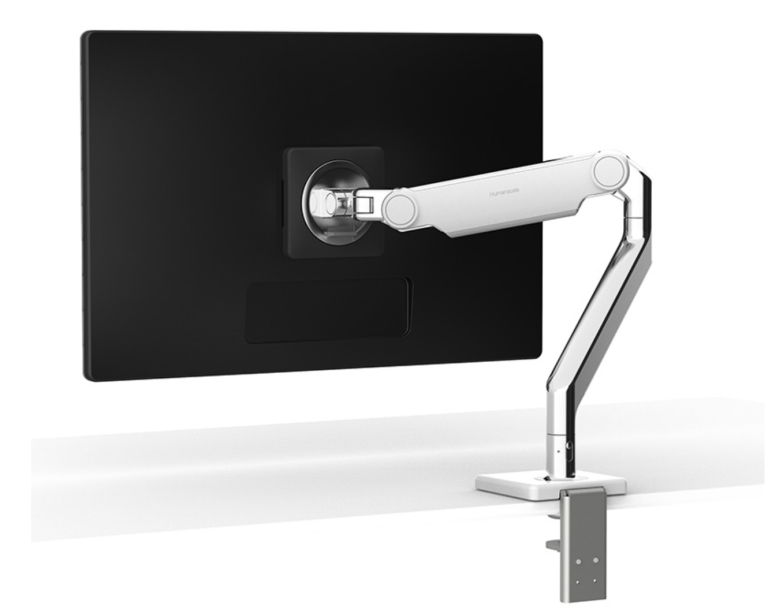
M2.1 by Humanscale
- Weight capacity: 5 – 15.5 lbs for a single monitor setup
- For larger weight capacity (6 – 28 lbs) monitor setup the M8.1 series is recommended
- For a multi-monitor setup the M Flex Series is recommended
- Flexible rubber channels easily hide, protect, and manage your cables
- Weight-compensating spring technology enables smooth and uniform height adjustment.
- A built-in Counterbalance Indicator, to counterbalance the monitor weight before its installation to reduce expensive computer set-up costs
- Compatible with M/Connect 2 docking station and M/Power charging station
- 15 year warranty***
Why we recommend it: We love the M2.1 because it’s super easy to install and adjust – you can move your screen around effortlessly. This monitor is built to last and can be upgraded if your needs change, so it’s a great long-term investment. Plus, it’s eco-friendly, which means you’re doing something good for the planet while making your workspace more comfortable.
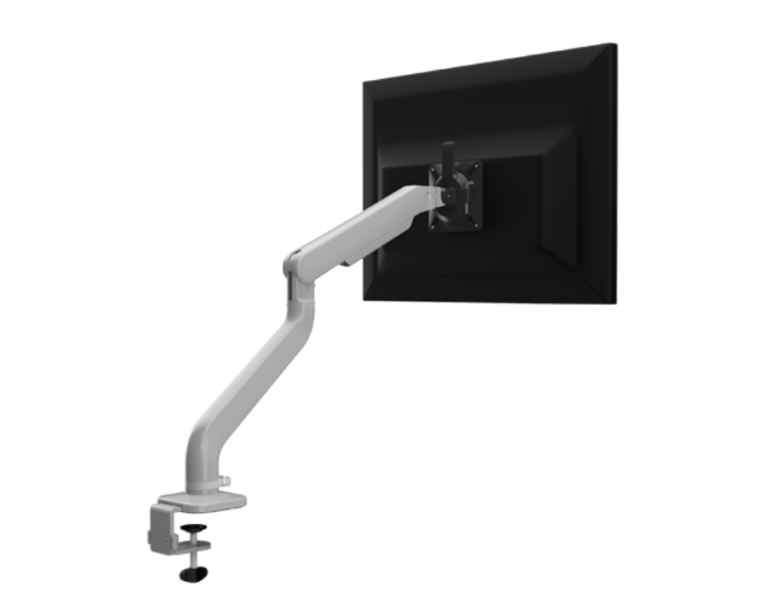
Kata Series Single Motion Monitor Arm by Fellowes

Key Features:
- Finger touch dynamic height adjustment
- For single monitor setups
- Recommended for worksurfaces 36.0″ deep or less
- 4.0 lb.–20.0 lb. weight capacity
- VESA 75mm/100mm quick release
- 180º lock-out feature
- Desk clamp included
- BIFMA Compliant
- Lifetime Warranty**
E2 SINGLE by HAT Collective

Key Features:
- Weight capacity: 2-20 lbs (flat monitors), 2-16 lbs (curved monitors)
- For a single monitor setups
- 13.3″ height adjustment range
- 180° or 360° rotation at base
- Tension indicator for easy setup
- VESA compatible (75mm & 100mm)
- Warranty*** 10 years
Eppa™ Single Monitor Arm by Fellowes
The EPPA-SLV by Fellowes is a robust and versatile monitor arm designed to accommodate a wide range of monitor sizes and weights. This arm is particularly well-suited for users who need to support larger displays or frequently switch between portrait and landscape orientations.

Key Features:
- Weight capacity: 2-20 lbs (flat monitors), 2-16 lbs (curved monitors)
- For a single monitor setups
- 13.3″ height adjustment range
- 180° or 360° rotation at base
- Tension indicator for easy setup
- VESA compatible (75mm & 100mm)
- Warranty*** 10 years
Level Up Your Workstation With A Monitor Arm
Choosing the right monitor arm is essential for creating an ergonomic workstation that enhances both health and productivity and free up more space on your desk. With a wide array of options available, it’s important to consider key factors such as weight capacity, screen size, ease of installation, durable construction, and the flexibility to adjust your display easily. Look for features like tension adjustment, rotation capabilities, and integrated cable management to ensure you select a mount that truly elevates your workspace and supports your productivity.
Take the time to evaluate your needs and choose a monitor arm that will sustain you during long workdays while helping you maintain proper posture. Remember, the most effective ergonomic setup is one you will actually use. Therefore, opt for a monitor arm that not only fulfills your technical requirements but also aligns with your personal preferences and workflow.
FAQ's
How do I choose the right monitor arm for my workspace?
Consider factors like weight capacity, screen size, number of monitors, desk space, adjustability (height, tilt, swivel), installation method (desk clamp or grommet mount), and cable management. If you are planning to add more monitors later on, consider a post solution like the MFlex and Kata Post. Also review product reviews and warranties before purchasing.